Wednesday, April 19, 2017

Tamagotchi Connection V5

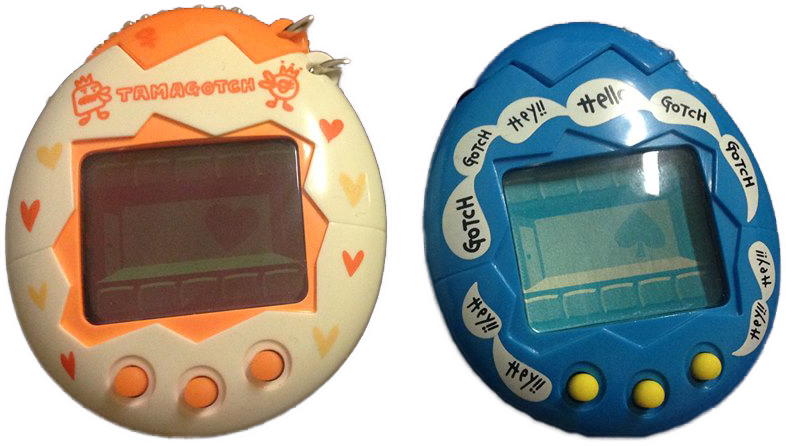
The Tamagotchi Connection V5- also called the Tamagotchi Familtchi- was released in late 2007 in Japan and early 2008 for the rest of the world.

It has a larger screen that the previous Connection models, making extra space to hold more characters on screen at a time.

The physical shell design differed somewhat between regions, but the one pictured here was the US version.

*~*~*~*~*~*

When you first start it up, you'll have three eggs. On generations after this, you'll get between one and three eggs when your adult Tamagotchis mate.

A big part of this Tamagotchi release is family bonding. There is now a screen on the status menu where you can see your family's bonding level. It is shown as a percentage that rises by 10's. The lowest it can be is zero, and the highest it can be is 100. This level also affects what animation is shown when you press the right button.

At set times during the day, your Tamagotchi family will call for your attention. The discipline button has been replaced with a button to answer this call. They will ask for your help deciding on one of three items to use. The items vary between calls. Answering these calls will help to raise the bonding level, but missing the calls will lower it.

The bonding level can also be raised by using certain items that are bought from the TV shopping channel.

The first item will make them more likely to grow into smart-family characters, the second item will help them grow into cheerful-family characters, and the third item is for easygoing-family characters.

Upon marrying, adult characters will transform into 'parent' characters, which vary depending on what family the character falls under.

*~*~*~*~*

The family you get at the start will be shown as a 'mixed family' under the status menu. By getting certain characters and marrying them to their counterparts while the family bonding level is at 100%, you can create 'pure families,' however.

Allowing your own Mametchi to marry a Chantotchi, the Mame Family will be created.

If you let your Memetchi marry a Mumutchi, the Meme Family will be created.

Letting your Kuchipatchi marry a Yonepatchi will create the Kuchipa Family.

Finally, allowing your Violetchi marry Sukatchi will result in the Violet Family.

*~*~*~*~*

There are a few other pure families, but they're obtained by various forms of neglect. If your family transforms into one of these, there are items that you can use to change them back.

The Large Family is created by overfeeding your Tamagotchi a number of times. This can be reversed by feeding them the Balance Biscuit or using the Mirror item.

The Small Family is created by missing too many hunger calls. This one is reversed by feeding them Milk or using the Magnifying Glass item.

The Ninja Family is created by missing too many happy calls. Change them back by feeding them a Steamed Bun or using the Whistler item.

*~*~*~*~*

Some characters will also transform into others when certain items are used on them. Feeding a Hatsugatchi Sesame Pudding will transform it into  KuroMametchi. Watatchi will transform into Makiko if you use the Girl's Dresser item.

*~*~*~*~*

There are four games that can be played. They are all played with the oldest child. The last two games can only be access on the second generation or later.

The first is TV Surfing. The oldest child will scroll through channels, each featuring a certain character. You're given a specific character at the top, and you have to use the left or right button to stop it on a specific channel. Try to stop it when the characters are matching.

The second game is Tea Time. You have to use the left and middle buttons to pour tea. Only pour when the glasses are sitting upright! You can just pour in the left, just the right, both, or neither.

Starting on the secound generation, you can play Golf Putt and Shoe Pairs.

Golf Putt is played with the oldest child and the father character. An arrow appears under a golf ball, and you have to press the left or right buttons in order to stop it under the ball. Fully completing this game can increase your family's bonding level.

The last game is Shoe Pairs, and is played with the mother character and the oldest child. You are shown a shoe, and other shoes will scroll by at the bottom. There is a little gap that you have to get the matching shoe through to form a pair. Press the left or middle buttons to stop the scrolling and raise up the shoe that's under the gap. Fully completing this game can increase your family's bonding level.

*~*~*~*~*

A new icon included on the V5 was the television icon. There is shopping channel, a dating channel, and a travel channel.

The shopping channel works like the shop from previous versions. You can buy food and items for your family here. You have an unlimited supply of whatever kind of food you buy, so you only need to buy each one once.

The dating channel is how your Tamagotchis get married if you aren't able to connect with another. You can access it 48 hours after your family become adults, and you can access it up to three times a day. You choose which character you want to get married, and the Matchmaker presents you with an option. If you don't like them, you can turn them down and try again. If you choose to accept, though, your Tamagotchi will leave with their new mate, leaving behind their siblings to start a family of their own.

The last channel is the travel channel. It functions like the pause feature of previous Connection models.

*~*~*~*~*

This was pretty fun to play with. It was really cute to see so many character on the screen at a time, and to see them eating and playing with items together.

The games don't payout very much, so it can take a while to save up points for new items and food.

After having played with both the V5 and the V5 Celebrity, however, I'd probably choose the Celebrity over this one. It's got more games and features than the V5, and I liked that the Celebrity included the Royal Tamagotchi family, even if it no longer includes some of the other pure families

Further Reading:
Tamagotchi V5 Celebrity

Tuesday, April 11, 2017

Memetchi Figure

The Memetchi figure is pretty cute.

This one comes with a clothing shop! You can buy things like shirts, jeans, and even wedding clothes! When you use the items, it'll play a little animation of your character wearing the outfit. Hard to get much cuter than that!


 *~*~*~*~*

Like with other figures, there are two games you can play.

The two in this one are Hit the Note and Panel Matching.

In Hit the Note, your Tamagotchi will run along the bottom of the screen on the left side. Notes come from the right side. You have to use the right and middle buttons to move the crosshairs up and down and the left button to shoot the notes as they come by. The button layout for this one's a little odd and takes some getting used to. Missing two notes ends the game early.

The second game, Panel Match, is like the shape game from the V4.5. You're given a circle, square,
and triangle at the bottom of the screen that correspond to the buttons they are above. Shapes fall down from the top, and you have to move the shapes at the bottom to match the pattern of falling shapes. For example, if the square was above the right button and the triangle above the left, you'd have to press those two buttons at the same time in order to swap the shapes at the bottom.

*~*~*~*~*

This figure's pretty fun, and I love the clothes you can buy. The games are kinda challenging, especially with the odd controls, but I find them both really fun to play. If you liked the clothing items from older Connection models, this is a figure I'd really suggest checking out.

Friday, April 7, 2017

Tamagotchi Osutch and Mesutchi

The Tamagotchi Osutchi and Mesutchi were released exclusively in Japan in 1997.

The Osutchi is the male version, and the Mesutchi is the female version. These were the first Tamagotchis with the ability to connect in order to mate.

*~*~*~*~*

There are two newly-added options, the last two select-able icons. One is for checking the TMP and one is for mating. This gives a total of ten icons, similar to the connection-era releases.

TMP stands for Tamagotchi Mating Power. There are four levels of TMP, and each level contains different obtainable characters. If two characters with the same TMP are mated, their children's level will be higher. If two of different levels are mated, the children will take on the lower-level. The current generation your Tamagotchi is on can also be checked here.

The second new icon added is for mating. When an adult character becomes old enough, they can mate with a toy of the opposite gender. There are two characters on each version that can't mate, however. The two characters obtained from neglect will always refuse to mate, as will the oldie-characters.

*~*~*~*~*

In order to use the mating feature, take off the tops, connect the Osutchi and Mesutchi, and press the mating icon in both units. If successful, you'll see an animation on both units, and two new babies will appear with the female. The male baby will soon go with the father, and the female baby will stay with the mother.

The two new babies won't be recognized as siblings, so you're free to mate them together once they're old enough.

*~*~*~*~*

The game in this one is pretty easy. Your Tamagotchi will hold a white flag on the left side and a black flag on the right. Press the left button when it's holding up the left flag, or the middle button when it's holding up the right flag. It's not hard at all to get a perfect game.

*~*~*~*~*

One thing that I've noticed about this one is that it's very musical. Mating, playing the game,
hatching, everything seems to play a little tune. That's not bad though, since the sounds are pretty nice to listen to.

Every character has a counterpart of the opposite gender, which I find cute. As long as you don't end up with the neglect characters or wait too long to mate and get the oldies, it doesn't matter, though. Besides those, they can all mate. 

They're both fun, but you won't get the most out of it without running both versions on your own or finding another person to play with you.

Wednesday, April 5, 2017

Devilgotchi

The Debirutch no Tamagotch, also called the Devilgotchi, was a Japan-exclusive, released in 1998. A cellphone version was released in Europe in 2006, though it was renamed Tamagotchi Monster.

This one's pretty unique and could be seen as a counterpart to the Angelgotchi.
 
 When you first start it up and set the time, a bat will start flying around on-screen, and your new Devilgotchi will soon appear.

The weight has been replaced with a 'DP' or 'Devil Power' meter. It goes up over time. You need to prevent it from getting over 90, or risk getting a bad end and having the game end early.

When the devil does bad deeds, it needs to  be scolded with the discipline icon. This looks like a little angel in this version. Very cute.

Beyond just the normal discipline calls, there are other bad things your Devilgotchi can do. This can include pretending to sleep in the middle of the game, pretending to eat its snack, throwing its meals back at you, or refusing to let you clean the screen or look at the status meter. You know when it needs to be scolded because the screen will flash black with the character turning white. Scolding it when it does these things will lower its DP.

The medicine icon has been replaced with a handshake icon. Sometimes your pet will call for attention, but instead of turning the screen black, it'll look at you while smiling and wiggling its arms. This means it's looking for a handshake. Doing this will can lower its DP or raise its happiness.
 
 The game in this one is pretty fun. The Devilgotchi bounces along the bottom of the screen from left to right. You have to press the left and middle buttons in order to drop a star. You have to try and land it on or close to your pet. I find it seems to work best if you wait until your little devil bounces off one of the sides and then press the button for the opposite side.

You get four tries per game. You need at least three to win, but getting all four will raise its happiness by two points instead of just one. A much appreciated feature!

Unlike the Angelgotchi, this one evolves very slowly. It's long-lived, and if you're going for a secret character, can take more than two weeks for it to reach its final form.

There are two ways for the game to end. Allowing the DP to stay over 90 for two long will result in a bad ending. If your Tamagotchi is able to live a long life, it will return to the Devil World instead. When this happens, you'll see it looking sadly at the screen before it returns. After that, you'll see 'Good Friend' come up on the screen.

On a cute little side note, the angel-like secret character that comes from DevilMametchi- KuriDevitchi- is actually escorted home to the Angel Capital by two Angelgotchi instead.
 
 The Devilgotchi doesn't have the little delay between pressing the button and the toy actually reacting that the P1, P2, and Angelgotchi had. It moves nice and quickly, and the buttons feel very nice to press.

The sound on this one is pretty much the opposite of the Angelgotchi's. rather than being cute, soft, and hard to miss, this one is very, very loud. This is possibly one of the loudest virtual pets I've played with. It also has an odd buzzing sound to it that I've never heard with a Tamagotchi before. It's a little strange at first, but it's quite fitting for a devil.

This is important to remember if you go to bed early. This Tamagotchi has certain events that happen throughout the day, including bats flying across the screen, setting off fireworks late at night, dancing to music, and more. If you're a light sleeper, there's a chance this may end up waking you up, so try not to forget to turn off the sound before bed. 
 
 Upon getting it, the Devilgotchi quickly became a favorite of mine. It's got cute, devil-themed characters, a nice shell, and it's packed with little features and quirks that make it one of the most unique vintage Tamagotchis.

The downside to it, however, is its rarity. It was only released in Japan, and not a whole lot were produced. It's one of the most sought-after Tamagotchis, and also one of the most expensive. The price will probably keep most people away, but if you're ever able to find a good deal, I'd highly suggest picking one up.

Tamagotchi Connection V3

The Tamagotchi Connection V3 was released in 2006. It took a lot of features from the V2 and further refined them. It was the first Tamagotchi release to use the TamaTown website.

Physically, it's not too different from the previous versions, but it does feature a cute little antenna now. The start-up is very similar to the previous release, but you are now prompted to enter a username.

 It features different characters than the V2. It has one more than the V2 had, for a total of 52 characters.

The status menu now features an extra screen for viewing your selected username. This username would be used when connecting to TamaTown.


*~*~*~*~*

There are four different food options that you have an unlimited supply of, and four different snacks that work the same way. The 'treats' you buy for your Tamagotchi are now stored under food or snack, depending on which category they fall under. Each character has different favorite and least favorite food options which have different effects on their hunger and happiness than regular foods.


*~*~*~*~*

There are six different games that are unlocked as the character ages, Get ♪, Bump, Flag, Heading, Memory, and Sprint. Playing them raises your pet's happiness and earns points that can be spent in the shop.

In Get ♪, you have to use the left and right buttons to move a cup and catch musical notes as they fall from the top of the screen. Poop also falls, however, and catching that or missing a not will end the game early.

Bump works much the same as in the V2, use a button to stop a meter that appears at the top of the screen when it's as filled up with black as possible. This gives your Tamagotchi the best chance of winning.

In Flag, your Tamagotchi will hold up two flags. Arrows will appear at the top of the screen, and you have to press the left and right buttons to raise the correctly colored flag. The arrows may change what side they appear on, and fake arrows may also appear. It's a game you really have to pay attention during in order to complete.

The Heading game is another that works much like it did in the V2. Use the left and right buttons to move your character, and use the middle buttons to make it jump and hit the balls that fall down from the top.

Memory is pretty simple, just use the buttons to repeat the pattern that you're shown.

The last game is Sprint. Repeatedly mash the buttons to help your Tamagotchi run quickly and cross the finish line first.

 *~*~*~*~*

The shop restocks with food and items several times a day. You can play with them or feed them to your own Tamagotchi, or share them with others by giving them away as a present through infrared connection.

*~*~*~*~*

The biggest new feature with this Tamagotchi was the ability to connect to the TamaTown website. By doing so, you could play with your pet online and earn points and items that you could bring back to your toy.

You could also earn souvenirs here. There were 32 different souvenirs to collect. They didn't really have an effect in-game, but they were cute to look at.

Unfortunately, the site has not been active since 2013, so it's no longer possible to use this part of the Tamagotchi. Unless you're really into collecting all the souvenirs, it doesn't really change the way the V3 functions otherwise. All of the other functions are perfectly intact, and other items are possible to get through normal game-play.

*~*~*~*~*

This is a pretty fun one, one of my favorites. It's simple, but a little more refined than the V2 was.

That one of the main draws is no longer available is a little disappointing, but it was more of a supplement to the Tamagotchi than something totally necessary. 

If you have the chance and want to play with one that isn't too needy or complicated, I'd suggest giving the V3 a try.

Thursday, March 30, 2017

Tamagotchi Collection

My current collection of Tamagotchis, from top to bottom and left to right:

Vintage Series
Umi no, Osutchi, Mesutchi, Angel, Mothra, Genjintch, Mori no, TamaOtch, Devil, P2

P's, M!x, and Plus Series
Pierces, P's, M!x, EnTama, UraTama, Akai

Connection Series:
V1, V2, V3, V4, V4, V.5, V5, V5.5, V6

Tamago, Mini, Connection V4, and Gotchi Figures

Tuesday, March 28, 2017

Pocket Neopets Standard Edition

The Pocket Neopet was a virtual pet released around 2003. The character you raised was based off of Neopets you could create on the Neopets website at the time.

There were several different standard editions that came with one pet each.

*~*~*~*

Each version came with a 3D figure of the pet featured in that version, which could be stood up using the little holes in the terrain at the top of the toy. The figure could also be used to press the quick-access buttons on the main unit.

You'd start off by naming your pet, deciding what it likes to do, and how it greets others. This doesn't really seem to have an affect on anything, just adds a bit of flavor and makes it more similar to the regular website.

The 'goal' of the game was to unlock trophies gotten by beating the highest level of each of the games. These harder levels would slowly be unlocked as you earned points from beating the easier ones. There were three different games that could be played for points three times a day, and one game that could be played for points as many times as you wanted.

*~*~*~*

The first game was Techo Says. Press the buttons in the order they appear on screen.

The second game was Negg Drop. Sacks filled with neggs will fall from the top of the screen, and you have to use the left and right buttons to catch them in your basket at the bottom. Catching a checkered one will cause all of the sacks to fall faster, but catching a black one will cause your score to go back to zero.

The third game was Poogle Race. Alternate between pressing the left and right buttons to get your Poogle to run and cross the finish line first.

The last game was Scorchy Slots. Press a button to spin the slots. If at least two out of three icons matched, you would be awarded points based on the shapes that were matched.

 *~*~*~*

There was a pretty big variety of items you could buy from the three different shops. The first and probably most important was the food shop. Your pet needed to be fed at three specific times throughout the day. The food shop would sell three different items a day, based on food items you could get on the main site.

There was also a toy shop where you could buy toys for your pet to play with. They could be used up to three times before disappearing.

The last shop was the Petpet shop, where you could buy Petpets for your pet. These Petpets could be used more times before disappearing if they were freshly bought. Trying to use an older Petpet multiple times would have it disappear sooner.

*~*~*~*

Your pet would sometimes get sick, and you'd need to take it to the hospital where you could buy medicine depending on what disease it caught.

Your pet had happiness, intelligence, and health levels, which could be raised by feeding it on time, playing with it, and giving it toys and Petpets.

If you didn't take good care of your pet, you'd be greeted with a screen showing it packing up and walking into the sunset. You'd have to start over at this point.


The goal of the game was to get first-place trophies in all of the games but Scorchy Slots, which had no trophy or different levels. Doing so would give you a rare item code that could be redeemed on the main Neopets site. Unfortunately, these codes are currently no longer redeemable.

*~*~*~*

There were a lot of different cute animations on this virtual pet, which was nice to see. I felt like it kind of focused on the games aspect more than the pet itself. It becomes weirdly needy after a while. I found it hard to feed it on time, and it just seemed to get harder and harder to do so. Sometimes its stats seem to drop for no apparent reason.

It did come with an alarm feature that you could set a message into, and a battery door close/open option on the back of the toy. Not things I'm gonna use a lot, but it was nice to see. This pet also let you set the date, so sometimes events and things would happen based on this.

It had some unique features, and it's one that's fun to play with for a while, but eventually gets kind of tedious and hard for no apparent reason. It's especially disappointing that the codes that you'd get from it can no longer be redeemed. Ultimately, it's not one I'd highly suggest.

Wednesday, March 22, 2017

Tamagotchi Chibi - Tamagotchi Mini

This release was known as the Tamagotchi Chibi in Japan and the Tamagotchi Mini in the United States. It was released in both regions in 2005. The one pictured here is a Chibi.

*~*~*~*

It is a very small Tamagotchi, only a fraction the size of the previously released Connections.

Rather than having menus like a standard Tamagotchi, its buttons are now context sensitive. If the Tamagotchi needs something and you press the right button, it will play a short little animation to let you know.

The left button lets you interact with the pet. If it's hungry or needs a snack to make it happy, the button will bring up the food menu. This button is also used to bring up the menu for turning the light on and off when it goes to sleep and for flushing the screen.

There's no game in this version.

*~*~*~*

After hatching, it is already in the child stage. After 24 hours, it will turn into an adult based on the care it was given.


With good care, it lives for about two weeks.

The Chibi and Mini feature different secret characters. The adult characters have the possibility of turning into a secret character after about a week of play. The healthiest adult character, the rabbit Mametchi, can turn into Super Unchi-Kun in the Chibi, and Ginjirotchi in the Mini.

There was also a special 'Good Luck' edition of the Chibi that featured a different secret character.

*~*~*~*

Bandai is re-releasing the Chibi in April 2017 for the 20th anniversary of the Tamagotchi brand.

The Chibi and Mini are very bare-bones. They're more like interactive keychains than virtual pets. Still, they're really cute and don't take up much space at all. They're also really good if you don't have a lot of time and space but still want to care for a Tamagotchi. If you've got more time, though, you may want to look into a more interactive version.

Tamagotchi Connection V2

The Tamagotchi Connection V2 was released in the US in 2005 as a sequel to the Tamagotchi Connection V1. It had the same basic features as the V1, but included more characters, different games, and a newly added shop.

*~*~*~*

Most of the menus worked the same way as they did in the V1, but the status menu now featured an area to show how many points you'd gathered from playing games.

The food menu also featured a new section below the snack and meal choices, treats. The one-time use food items you bought from the shop would appear under here. Treats could fill up your Tamagotchi's hunger or happiness meters more than regular food or snacks would. Each character also had a favorite and least favorite food item.

*~*~*~*

There were four different games that were unlocked as the Tamagotchi aged. Once it died or a new generation started, the games would have to be unlocked again. Besides just raising happiness and lowering weight, the games would now also give out points depending on how well you did in them, with a perfect game resulting in the highest payout.

The first game is Jump. Three circles with white centers appear at the top of the screen. They will turn black one-by-one, and you have to hit the corresponding button on your toy. The faster you press the buttons when they appear, the farther your Tamagotchi will jump.

The next game is Bump. A meter will fill up above your Tamagotchi, and you have to press a button when the meter is as high as possible. Your Tamagotchi will then fight with another as they try to knock each other down.

The next game is Heading. You have to use the left and right buttons to move your character between the left, right, and middle spots at the bottom of the screen. Balls will fall down from the top, ad you have to use the middle button to make your Tamagotchi jump and hit them back up.

The last game is a slot machine. Press the buttons to stop the corresponding reels. Circles and triangles will earn you points, but try not to stop them on the x's.

*~*~*~*

The points you earn from games can be used to buy items in the shop, which is accessed under the play menu. From here, you can buy new food or items for your Tamagotchi to play with.

The V2 could connect with either the V1 or other V2s.

*~*~*~*

The shop is very nice. Having the option to let your pet play with more items and being able to give it treats is nice. The games are a little hard, and the payout isn't super-high, so taking full advantage of the shop can sometimes be a little hard, though.

It's a fairly hardy pet, and not too hard to raise. It's one that's good if you're looking for one with a few more features than the V1 or vintage models, but don't want one that's too complex.

Saturday, March 18, 2017

TamaOtch

This is an interesting one, pretty unique for the vintage Tamagotchi models.

The TamaOtch was released in Japan in 1998. It was based off of the comedian and actress Tamao Nakamura. It even has a character based on her appearance.

The goal of this one is to raise it to be a good performer. It's got a motion and sound sensor like some of the other vintage models, but it's a little more sensitive. It's possible to activate it even by making loud noises near the toy.

At the start, you get to choose between three different styles of eggs. This might have some effect on the character your pet grows into, but I'm not entirely sure about this.

The Status screen now has an extra bar besides just the one for discipline, now it has one for its acting training as well. This gets filled up as it successfully completes the training mini games.

There's an extra option under the food menu, one for giving your Tamagotchi fan-letters when it's feeling sad. This can help cheer it up.

The game is a slot machine. You press the left button to stop the left reel, and so on. I find this really hard to win, and the acting games lower its weight, so I find it easier just to feed it snacks to make it happy.

The last option at the top is the acting mini-game menu. There are three different things your Tamagotchi can practice here. The first is ad-lib, the second is dancing, and the third is acting. They all contribute to filling up the acting meter, and all play the same, so it really seems to just depend on which animations you like the best.

Each one has three rounds. You press the left or middle buttons to make your Tamagotchi to perform a move. You do this three times a round, and then it tries to copy the moves you told it to do. It always gets the first two right, it's the third you really need to look for. When it gets them right, tap the side of the toy or make a loud noise near it to praise it. When it gets it wrong, press the left button to let it know. It has to correctly complete at least two of the three rounds to win.

The toilet icon can be used to flush the screen even if your Tamagotchi has gone to sleep. This is pretty helpful.

The growth pattern on this one is a little odd. Some characters are shared between growth stages. One one, you may end up with a certain character during the toddler stage, and running it a second time, you may end up with the same character as a teen instead.

It greets you with a message flashing on the screen when it wakes up. Sometimes it seems to get stuck flashing this over and over though, which means constant beeping. I find it's easiest just to keep the sound off with this one.

Sometimes forgets who you are and greets you with a different message. You can tap the side of the toy to help remind it of who you are. You can also tap it when you have to give it medicine which seems to make it happier.

The TamaOtch is an interesting Tamagotchi. It's a little bit needy, but not too bad. If you have the time to check on it a couple times throughout the day, it should be fine. I don't find the characters super-interesting until it hits the adult stage. They aren't super-animated, and a lot of them repeat through the different growth stages. It's a little more rare than some of the other vintage models, but if you're able to find one and have time to experiment with the different eggs and training, it could be a really fun one to play with.

Tuesday, March 7, 2017

Tamagotchi Connection V1

This was the very first Tamagotchi version I ever played with. It's a pretty fun little Tamagotchi.

The Tamagotchi Connection V1 was the reboot of the Tamagotchi franchise, and was release
world-wide in 2004.

*~*~*~*

Once you've set the time and your birthday, it only takes about a minute for your new egg to hatch.

It has a random chance of hatching into a boy or a girl. This doesn't really have too much of an effect, the only thing it changes is the gender of the Tamagotchis it can mate with over connection with other versions.

After this, you get to name it, with five spaces for letters.

*~*~*~*

The Status screen was upgraded from the original vintage models. It now shows a generation level, much like the Osutchi and Mesutchi vintage models. These two models were probably what inspired the Connection features of the Connection/Plus models. It also displays your Tamagotchi's name.

It gets different food items in different stages; the babies get bottles, the children and teens get bread for food and candy for a snack, and the adults get character-specific food items. 

The toilet icon works much like it did in the vintage versions, but now if you use it just before your Tamagotchi poops, they'll use a toilet instead of leaving it on the floor.

*~*~*~*

This was the first version to feature two games at once, in this case, a dancing game and a jumping game.

In the dancing game, you have to mash the buttons to copy dance steps. You have to copy more steps the farther you get.

In the jumping game, you mash buttons to help your Tamagotchi jump over hurdles.

Playing these lowers weight and raises happiness.

*~*~*~*

The biggest feature introduced with these Tamagotchis was the Connection feature. By using the last icon on the top, you had the option of connecting with other Tamagotchis.

They could play games together, give each other presents, and ones of opposite gender could even mate and have children once they were old enough.

The discipline option was expanded on a little bit. The option to praise your Tamagotchi if it gets sad was added in, which also helped to raise the discipline meter.

The other new icon that was added in was the friend list icon. This would let you look at the names and friendliness levels of the Tamagotchi's you connected with, and gave you a menu to access the items your Tamagotchi received through connecting.

Children and teen Tamagotchis could receive a ball to play with, while adults would each receive to character-specific items, such as shirts or wings. The items don't really have any effect other than playing a cute little animation.

*~*~*~*

There were characters from the P1, P2, and the Osutchi and Mesutchi. A few original characters were also added in. Some were only available in even generations, while others were only available in odd ones.

If you didn't have a friend with a Tamagotchi or a second one of your own to mate yours with, the Matchmaker would eventually start showing up at certain times once your little pet was old enough. She would come by a few times a day with a potential mate for you Tamagotchi. You could either accept or reject her offer.

If you declined, she'd leave, and eventually come back with a new match. If you accepted, your Tamagotchi and its new mate would be left on screen, they'd kiss, and it'd cut to a little fireworks scene in the sky. When it returned to your Tamagotchi, their mate would be gone but they'd have a new baby beside them.

When mating through Connection, the female Tamagotchi would have two babies of the same gender. One would leave with the father, and one would stay with the mother.

*~*~*~*

Your Tamagotchi would spend the rest of that day and the next with the baby. However, it returns to the Tamagotchi Planet the next night, leaving its baby in your care. If you turn the lights on at the right time, you could even catch it looking at its baby just before it leaves.

The V1 also introduced the Oldies. Your Tamagotchi would grow into an elderly character if left unmated for too long. The Matchmaker wouldn't come by anymore at this stage. Oldies could only mate with other oldies of the opposite gender, and it would result in a baby that would grow into a secret adult character.

*~*~*~*

It's a pretty fun Tamagotchi version. Plenty of characters for an older model, some that don't get featured a whole lot nowadays. Two fun games, and a whole lot of charm despite the simplicity. It's one I find myself returning to over and over again

The Tamagotchi in the pictures was my very first, so I have a bit of a soft spot for it. It's been beaten up, lost its keychain and reset buttons, been debugged, un-debugged, covered in stickers, and had several screws replaced. It's really been through a lot. Still works great, though, and I'll keep using it for as long as it lives.

Kuchipatchi Gotchi Figure - Tamatown Tama-Go

I really like this figure, though I may be a little biased due to my love of Kutchipatchi.

It comes with two games and a Chinese restaurant.

The restaurant features dishes such as shark fin soup and fried rice. Some of them are quite expensive, but it's cute to see your Tamagotchi take its time eating and make cute little faces as it does. It's especially cute when your Tamagotchi goes with its family and they eat together.

The games featured are Vegetables and Flag.

In the first game, vegetables fall down from the top of the screen and you have to try and catch them in their corresponding bins at the bottom. You move the bins with the left and right buttons so they line up with the correct vegetables.

In the second game, two arrows will be periodically displayed at the top of the screen, pointing either up or down. Your Tamagotchi hold two flags. You have to get it so the flags match up with the arrows. If the arrow on the right is pointing down, that flag has to be down. You press the left button to change the position of the left flag from down to up, and use the right button for the flag on the right.

The games featured aren't my favorites, they're a little slow for my tastes. However, I absolutely adore Kuchipatchi, and love getting to see him all dressed up to work at the restaurant. I also like having the restaurant there, having the option to take my Tamagotchi out for a nice treat every once in a while is nice.

The restaurant figures are some of the cuter ones, I think, especially when the entire family is able to visit. 

Sunday, March 5, 2017

Tamagotchi Akai

The Keitai Kaitsuu Tamagotchi Plus Akai, often shortened to just Akai, was released on July 2005. It was the second version of the Keitai Kaitsuu Tamagotchi Plus released, featuring new characters and games.

*~*~*~*

The big thing you probably notice about this one is the red pixels. They're pretty, but a little hard to see in a way that's a little hard to describe.

The characters found in this version are themed around the color red to match the red pixels, like the UraTama had blue-themed characters to match its blue pixels.

*~*~*~*

It starts out, as usual, with you setting the time and waiting for your egg to hatch. It then lets you name your new baby Tamagotchi.

The Status screen is pretty standard, though it's also used to show how many points you've earned playing the game, and how many generations your pets have lived for.

The food is pretty nice, there are four different choice for food and four for snacks at the start. 

One snack is a glass of wine. It won't take the wine until it's at least at the teen stage. When it drinks it as a teen it throws up, but it doesn't change its happiness or hunger levels. It makes the adults dizzy. It's a cute touch to see the little animations that go along with this.

The shopkeeper will visit your Tamagotchi at certain times of the day. You can choose to buy the item he is selling if you have enough points, but you can also refuse if you'd prefer to save.

You gain an unlimited amount of any food items you buy. The shopkeeper also sells items your Tamagotchi can play with, such as balls or balloons.

*~*~*~*

The Akai has three games, a catching game, a heading game, and a race.

In the catching game, you work to catch the poop that is falling from the top screen into one of three trashcans. You change which can is open with the left and middle buttons. Don't catch any of the falling moneybags, or the game will end.

In the heading game, press the left or middle button to hit falling letters into a mailbox. I've found it works best to wait until just after the letter has fully come on-screen to hit it, that seems to give the best rate of knocking it into the mailbox for me.

The last game is a race. It shows you the three competitors, starting with your Tamagotchi, and then lets you choose which Tamagotchi you think will win. You only win points if the
Tamagotchi you chose comes in first, but your Tamagotchi will lose weight in this game regardless of what place it comes in or if you guessed correctly.

*~*~*~*

When you press the right button when nothing is selected on the screen, it'll play a little animation. Some Tamagotchis have more than others. Most adults have three, for example.

The Akai can connect with the UraTama or EnTama, the Keitai, other Akais, the Plus, the Hanerutchi 1, or older models of Japanese phones.

*~*~*~*

I enjoyed this one. Not too hard, not too many characters, it made me think of a mix between
the Connection V1 and V3.

The hunger and happiness drain isn't too bad on this one, but it gets sick easily if you leave the screen dirty for too long. Make sure to clean it regularly!

I like that the food and snack items you buy are unlocked permanently.

The games can be a little hard to completely finish, but they're fun to play, and the race is good for lowering weight if you don't have time to really play the games.

All in all, it's a pretty fun version, one I like going back to every once in a while when I'm looking for a version that's fun without being too complex.